 ChatGPT for BeginnersFree course · about 1 hour
Keep the ChatGPT Conversation Going
Quick answer. Improve a ChatGPT reply by saying exactly what to change and what to keep. Staying in the same conversation lets you refine the work without starting over.
By the end of this module, you’ll be able to: Refine an answer in two or three follow-ups instead of deleting the chat and beginning again.
Time: about 12 minutes · You’ll need: the invitation from Module 2.
Why this matters
The first answer is a draft. That is normal. People waste time because they either accept a messy first version, or they throw the whole chat away and try to write a “perfect” prompt.
The faster habit is smaller: keep the parts you like, name one change, and ask ChatGPT to preserve the rest. Two or three of those rounds usually get you to something you can use.
Lesson 3.1: Ask for one change at a time
Stay in the picnic conversation. Look at the invitation from Module 2, then ask for a specific revision. Useful follow-ups sound like this:
- Make the invitation warmer, but keep the confirmed details exactly the same.
- Shorten it to four lines.
- Use simpler words.
- You added a venue, but I have not chosen one. Remove it and leave a labelled blank.
If ChatGPT misunderstands, correct it directly. In a long chat, repeat important facts so your next request is clear: Keep the date, time, and venue as labelled blanks.
The pattern is always the same: change this, keep that.
Lesson 3.2: When to start fresh instead
Stay in the same chat when you are still working on the same job. Start a New chat when the topic has changed, the conversation has become confused, or you do not want earlier instructions leaking into a new task.
Examples:
- Same chat: shorten the invitation, then make it warmer.
- New chat: you now want help writing a supplier email that has nothing to do with the picnic.
For this course, keep refining the picnic invitation in the same conversation. That is how you practise the skill.
Example: three quick rounds
- Return to the invitation from Module 2.
- Ask: “Shorten it to four lines. Keep the date, time, and venue as labelled blanks.”
- Compare the two versions. Name one remaining change you want and ask for it.
Success check: The new version reflects your change and preserves the required blanks. If it does not, correct it in the next message.
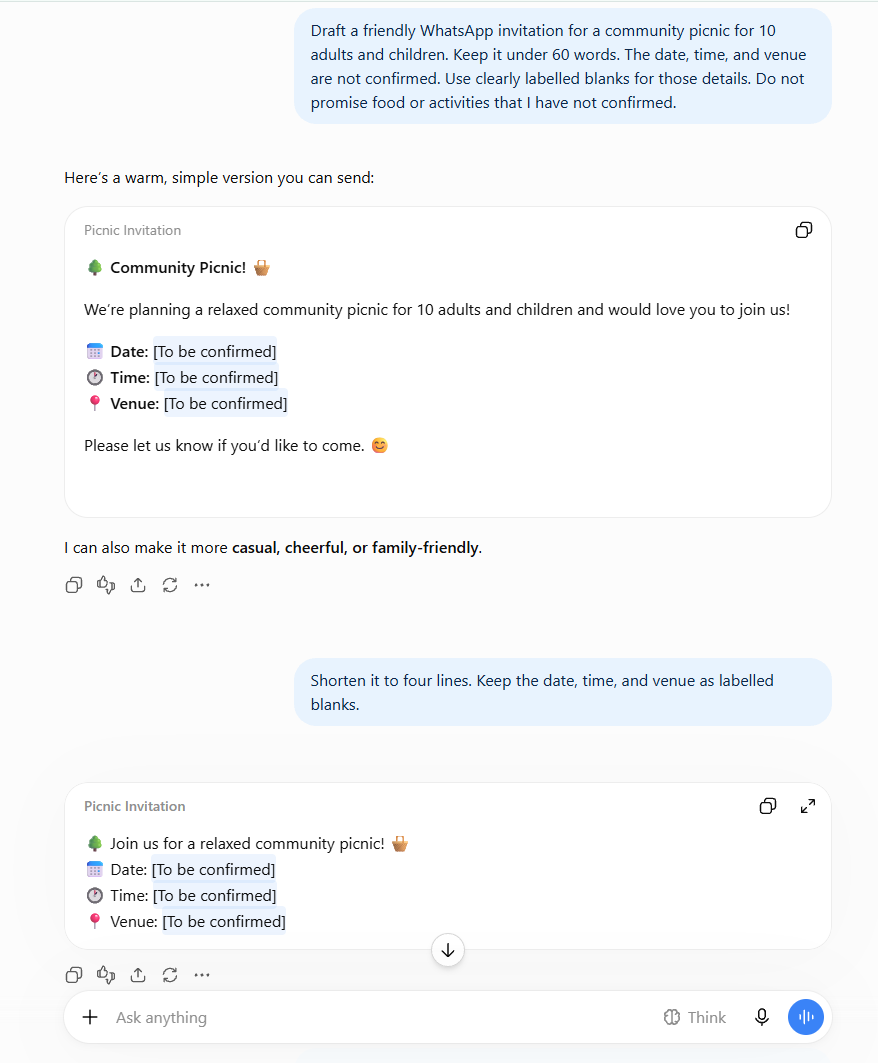
A good third round might be: Make it sound friendlier, but do not add food, activities, or a venue. Then read it again. You are training yourself to check, not just to generate.
Common mistakes to avoid
Mistake 1: Accepting the revision without comparing it.
A reply can become shorter while accidentally changing a fact. Check the parts you told ChatGPT to preserve.
Mistake 2: Stacking five changes into one message.
If the answer comes back messy, you will not know which instruction it missed. One change at a time is slower for one minute and faster for the whole task.
Mistake 3: Starting a new chat because the first draft was imperfect.
Imperfect is the point of a first draft. Follow up. Only start fresh when the topic itself has changed.
Quick practice (5 minutes)
Do this now:
- Send the four-line revision if you have not already.
- Compare it with the previous version. Circle one fact that must stay the same.
- Ask for one more change, and name the fact that must be preserved.
- Stop after three versions. Good enough is the goal, not endless polishing.
Quick check
Why is “shorten it to four lines and keep the time unchanged” more helpful than “change it”?
Answer: It tells ChatGPT exactly what to change and what to preserve.
Key takeaway
Keep the parts you like and ask for specific changes to the rest.
Next up: You can now improve an answer in the same chat. Module 4 shows you how to give ChatGPT your own note or document so it stops guessing from thin air.
A gentle nudge: Revision is where the time-saving happens. Keep going.
Stay in the loop
Get practical AI tips and product updates, no spam, unsubscribe any time.

