 ChatGPT for BeginnersFree course · about 1 hour
Your First Conversation with ChatGPT
Quick answer. Open ChatGPT, send one clear message, read the reply, and send one follow-up. You do not need special commands to begin.
By the end of this module, you’ll be able to: Open ChatGPT, send your first message, and read the reply with confidence.
Time: about 12 minutes · You’ll need: a device with internet and an email address.
Why this matters
Everything else you do with AI starts here, with a single message. Most people feel nervous before their first try and then surprised at how ordinary it feels. It is just typing, the way you would text a knowledgeable colleague. Once you have done it once, the mystery is gone for good.
This course uses one small running example: a community picnic. You will stay in that conversation as you learn. Later you can use the same habit on real work.
Lesson 1.1: What ChatGPT actually is
ChatGPT is a tool you talk to in plain language. You type what you need and it writes back in full sentences. That is the whole idea.
The most useful thing to understand on day one is what ChatGPT is not. It is not a search engine. With a search engine you type a few keywords and get a list of blue links to go and read. With ChatGPT you write a normal sentence and get a direct answer written just for you.
It is also not a person who already knows your business. It does not know your clients, prices, or private details unless you tell it. That is normal. You stay in charge of what is true, what is private, and what you actually send or publish.
Why this matters: People who treat ChatGPT like Google type one or two words and get vague replies. People who treat it like a helpful colleague get useful answers. That single shift is worth more than any trick.
Lesson 1.2: Open ChatGPT and sign in
Follow these steps exactly. Each step is one small action.
- Open your web browser and go to chatgpt.com. On a phone, you can instead download the official ChatGPT app.
- Follow the sign-up or log-in instructions on the screen. A free account is enough for this course.
- You should land on a screen with a message box, often near the bottom, and a few starter options above it.
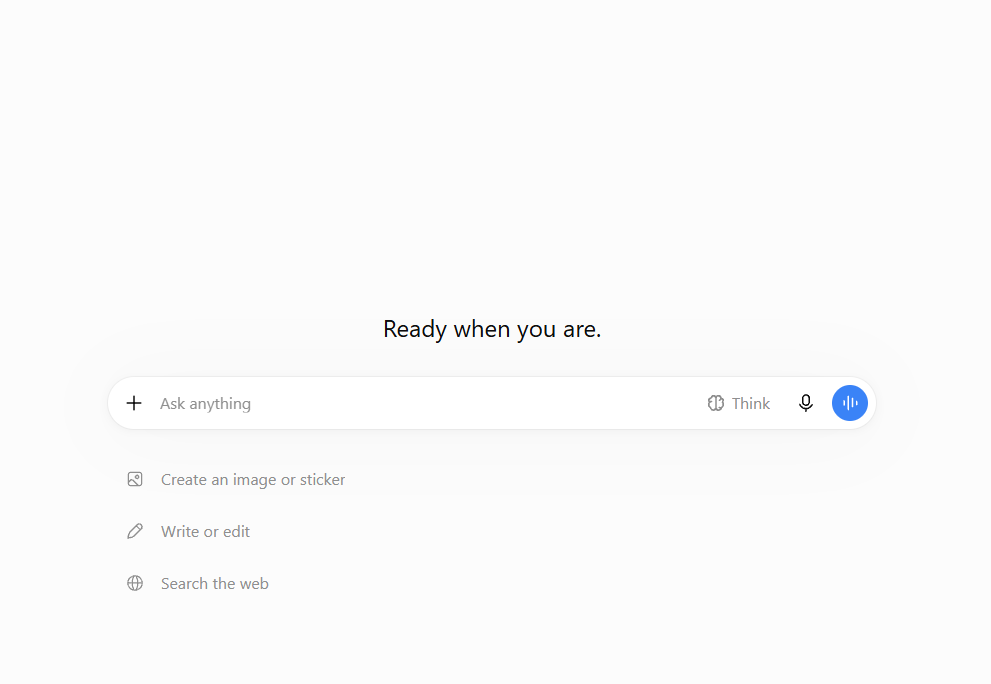
Check your progress: You should now see an open chat with a box waiting for you to type. If you are stuck on a confirmation email, check your spam folder. Screen layouts change from time to time, but the message box is the important part.
Lesson 1.3: Send your first message
- Click inside the message box.
- Type this picnic request, word for word:
I am planning a community picnic for 10 people. Suggest three simple activity ideas for adults and children. Keep the list short.
- Press Enter, or tap the send arrow.
- Watch the reply write itself out, line by line.
- Read the three ideas and pick one that seems useful.
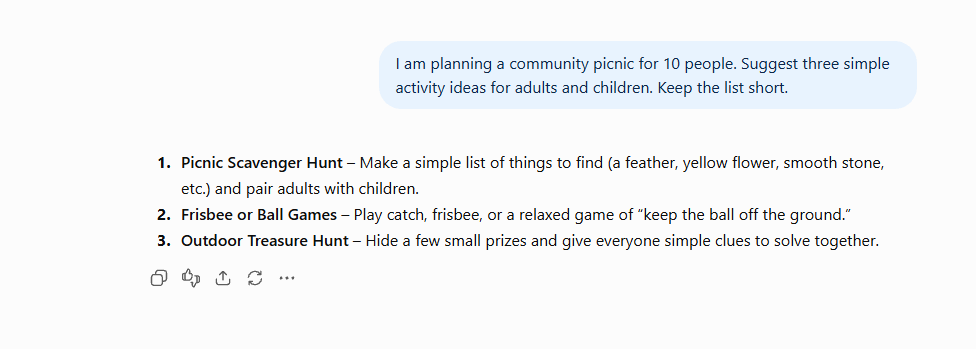
What you should see: Your message appears, then a friendly answer in full sentences. That is a conversation. You just had your first one.
Now send one follow-up in the same chat: Explain how we could do that with simple supplies. You have now sent a request and a follow-up. Stay in this picnic conversation for the rest of the course.
Success check: You can find your original message, ChatGPT’s reply, and your follow-up in the same conversation.
Example: an ordinary first question
Let’s say you are a small business owner with no time. You could type: Give me three quick lunch ideas I can make in ten minutes with basic ingredients. You will get three real suggestions, not a list of recipe websites to trawl through.
The picnic request works the same way. You named the situation, the number of people, and the kind of answer you wanted. That is already better than typing “picnic ideas”.
Common mistakes to avoid
Mistake 1: Waiting for the perfect wording.
Send a simple request first. If the answer is not useful, explain what you want changed. You never have to get it right in one go. Module 3 is all about improving answers.
Mistake 2: Typing keywords instead of a sentence.
Typing “picnic ideas” works, but “three simple activity ideas for 10 adults and children” works far better. Full sentences give ChatGPT something to work with.
Mistake 3: Starting a new chat for every tiny change.
Use New chat when you want a separate topic. For the rest of this course, continue in the picnic conversation so ChatGPT can build on what you already said.
Quick practice (5 minutes)
Do this now:
- Stay in the picnic chat, or open a new chat if you got lost.
- Ask ChatGPT one real question about your day, in a full sentence.
- Read the reply. Notice it answered you, not a search box.
- Come back to the picnic conversation before Module 2.
Quick check
What can you do if the first answer is not quite right?
Answer: Ask a follow-up question or describe what should change. You do not need to start again.
Key takeaway
ChatGPT is an assistant you talk to in plain sentences, not a search box you feed keywords.
Next up: You can send a message now. In Module 2 you’ll learn the single skill that turns a so-so answer into one you can almost use as is.
A gentle nudge: If “an assistant you can just talk to” is the part that excites you, that is exactly the idea behind every tool in the Ankor store. Keep going, there is nothing to buy yet.
Stay in the loop
Get practical AI tips and product updates, no spam, unsubscribe any time.

