 ChatGPT for BeginnersFree course · about 1 hour
Put ChatGPT to Work, Safely
Quick answer. ChatGPT can help you brainstorm, organise, draft, explain, and plan. A confident reply can still be wrong or incomplete, so you decide what to trust, change, share, and do.
By the end of this module, you’ll be able to: Use ChatGPT for a real task, check its work, protect your information, and know its limits.
Time: about 12 minutes · You’ll need: the picnic note and invitation from earlier modules.
Why this matters
The goal of this free course is not to make you trust ChatGPT more. It is to make you faster at using it for ordinary work without handing it the final say.
By now you can start a chat, write a clearer request, refine the answer, and work from a source. This last module is the daily habit: useful help, human check, private details kept out.
Lesson 5.1: Where ChatGPT shines, and where to be careful
ChatGPT is often useful for:
- First drafts of messages, lists, and explanations
- Turning messy notes into a clearer structure
- Brainstorming options you will choose from
- Rewriting in a simpler tone
Be extra careful when the answer includes:
- Names, dates, amounts, links, or promises
- Medical, legal, financial, or safety advice
- Anything you would send to a customer, staff member, or official body
- A connected tool that offers to take an action for you
OpenAI’s accuracy guide explains why replies still need checking. If web search is available and the task depends on current information, ask for sources, then open them yourself.
Lesson 5.2: Your safe daily workflow
Use this short loop for everyday tasks:
- Pick a low-risk job.
- Write a request with task, situation, format, and limits.
- Refine once or twice.
- If there is a source, work from it and compare.
- Check names, dates, amounts, links, and promises.
- Keep passwords, PINs, identity numbers, financial details, and other people’s private information out of the chat.
- You send, publish, or act. ChatGPT does not.
Review your account data controls so you know how conversations are handled. See the Data Controls guide. If a connected tool offers to act, read the action details before agreeing.
Example: redo the picnic invitation, then check it
Turn the fictional picnic note into a finished invitation. Stay in the same conversation and send:
Turn the fictional picnic note into a friendly WhatsApp invitation under 80 words. Use only the note. Include the event time, setup arrival time, venue, what to bring, refreshments, and rain plan. Do not invent a calendar date or promise anything else.
Read the invitation line by line. Compare it with the note. Correct unsupported or missing details before you consider sharing it. This activity does not require you to send or publish anything.
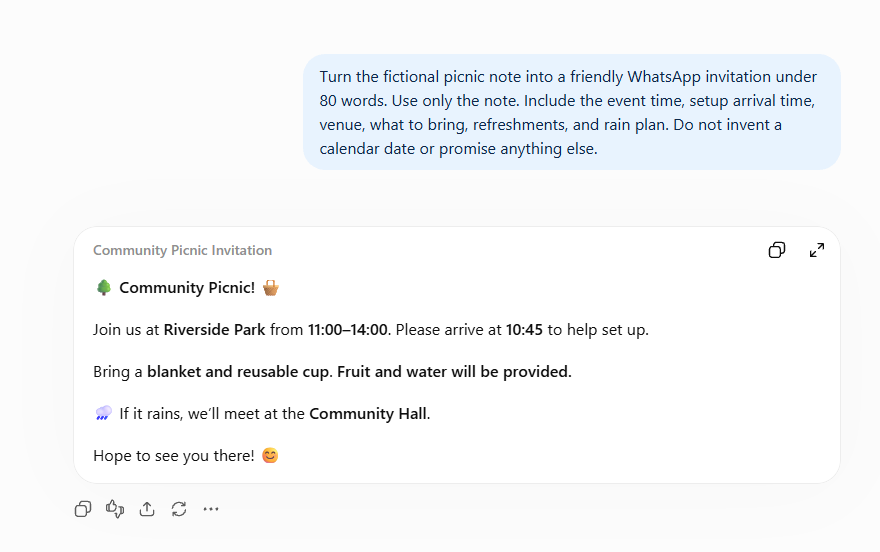
One possible checked invitation:
Join our community picnic on Saturday, 11:00–14:00 at Riverside Park! Please arrive at 10:45 to help set up. Bring a blanket and a reusable cup. Fruit and water will be provided. If it rains, we’ll meet at the Community Hall.
This is a written example, not a captured ChatGPT reply. A calendar date must be confirmed separately before a real invitation is shared.
Common mistakes to avoid
Mistake 1: Copying a fluent answer straight into a real message.
Fluency is not a fact-check. Read it once against the source, then send.
Mistake 2: Using ChatGPT as the decision-maker for high-stakes work.
Use a qualified human for medical, legal, financial, safety, and other high-stakes decisions.
Mistake 3: Pasting private details because “it will make the answer better”.
Use a fictional or stripped-down example. Better answers are not worth leaking a password, a customer record, or a bank detail.
Quick practice (10 minutes)
Do this now:
- Send the final invitation request if you have not already.
- Check it against the note using the list in Module 4.
- Correct anything extra or missing.
- On a scrap of paper, write one real task from your own week that you could run through the same five-module habit tomorrow.
Your completion checklist
- ☐ I sent a request and a follow-up.
- ☐ I named the task, audience, format, and limits.
- ☐ I revised a reply and checked preserved details.
- ☐ I compared a document-based answer with its source.
- ☐ I checked my final draft and kept private information out.
Quick check
Name one detail you would verify before sharing the invitation, and one kind of information you would keep out of ChatGPT.
Answer: Verify event details against the note, and confirm the calendar date before real use. Keep passwords, PINs, identity numbers, financial details, and sensitive or confidential information out.
Key takeaway
ChatGPT can help with the work. You decide what to trust, change, share, and do.
Where you are now
You can open ChatGPT, ask for what you actually want, keep the conversation going, work from a document, and check the result. That is the whole beginner habit.
Do one real task from your own life this week using the same steps. Then do it again next week and notice how much faster the second time feels.
When you want structured business workflows rather than another chat thread, browse the Ankor shop or start with Ankor Nexa. There is no purchase needed to finish this course.
Well done. You did not just read about ChatGPT. You used it, checked it, and kept control of the result.
Stay in the loop
Get practical AI tips and product updates, no spam, unsubscribe any time.

