 ChatGPT for BeginnersFree course · about 1 hour
How to Ask ChatGPT for What You Actually Want
Quick answer. A useful prompt tells ChatGPT what to do, who it is for, what the result should look like, and which details must not be guessed.
By the end of this module, you’ll be able to: Write a request that gets a genuinely useful answer the first time, using a simple recipe.
Time: about 12 minutes · You’ll need: the picnic conversation from Module 1.
Why this matters
Vague requests create extra work. “Help me with a picnic” leaves the audience, length, tone, and missing details wide open. ChatGPT then has to guess, and guesses are where answers go wrong.
The skill in this module is not fancy prompting. It is saying the job clearly enough that the first reply is already close. That saves time on every later message.
Lesson 2.1: The four-part recipe
A prompt is simply the message you send. You do not need a special formula every time, but these four parts make most requests stronger:
- Task: what should ChatGPT do?
- Situation: who is it for, and what is going on?
- Format: list, checklist, WhatsApp message, short email, table, and so on.
- Limits: length, tone, and details it must not invent.
Please do this task. This is for this person or situation. Make it this format or tone. Include these confirmed details. Do not guess or change these things.
If a missing detail matters, add: Ask me questions before you begin. Clear instructions help, but they do not guarantee a correct answer. You still read the result.
Lesson 2.2: Weak request versus strong request
Broad: Help me with a picnic.
That could become a menu, a speech, a packing list, or a date that was never agreed. ChatGPT has no way to know which one you wanted.
Specific: Make a simple preparation checklist for a community picnic for 10 people. Group it under “before the day” and “on the day”. Keep it to 8 items and do not invent a date or venue.
The second request names the job, the group size, the shape of the answer, and the gaps ChatGPT must leave alone. That is the whole skill.
Why this matters: You are not being fussy. You are reducing guesswork. The more important the work, the more those limits matter.
Example: turn a vague ask into a usable invitation
Stay in the picnic conversation from Module 1. Ask for a friendly WhatsApp invitation using this request:
Draft a friendly WhatsApp invitation for a community picnic for 10 adults and children. Keep it under 60 words. The date, time, and venue are not confirmed. Use clearly labelled blanks for those details. Do not promise food or activities that I have not confirmed.
Success check: Your prompt names the audience, format, tone, length, and details that must remain blank.
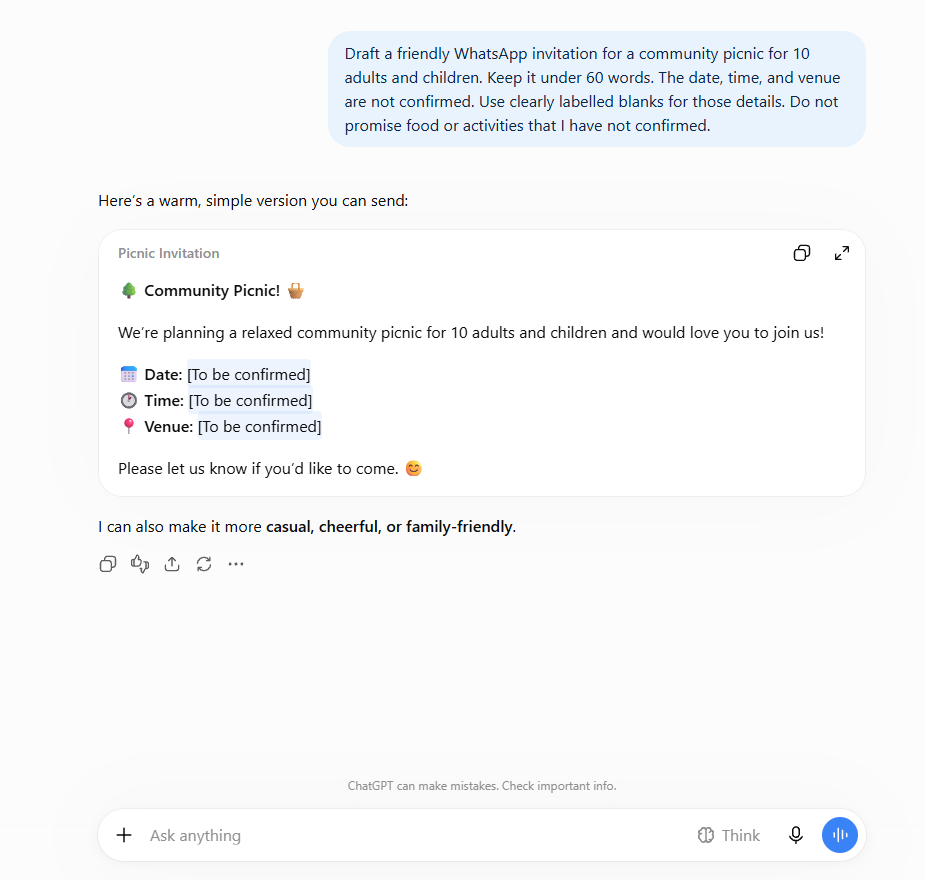
Read the reply once. Check that the blanks are still blanks, that it did not invent a park name, and that it did not promise food you never mentioned. If it added extra promises, that is useful information: your next message can remove them.
Common mistakes to avoid
Mistake 1: Leaving important gaps unexplained.
If the date or place is unknown, say so. Otherwise ChatGPT may invent one to make the message look finished.
Mistake 2: Asking for everything at once.
If you need a checklist, an invitation, and a packing list, ask for one of those first. Extra jobs can wait for Module 3.
Mistake 3: Assuming a confident tone means the facts are confirmed.
ChatGPT can sound sure while still filling gaps. Your limits are there so you can see, quickly, whether it respected the blanks.
Quick practice (10 minutes)
Do this now, in the same picnic chat:
- Send the WhatsApp invitation request above if you have not already.
- Check the reply against your limits: under 60 words, labelled blanks, no extra promises.
- If anything is off, do not start over. You will fix that in Module 3.
- Optional extra: ask for an 8-item packing checklist, and tell it not to invent a venue.
Quick check
Which details should you add if an invitation must fit into a WhatsApp message?
Answer: Name the audience, tone, and useful length. Include confirmed event details and tell ChatGPT which details it must not invent.
Key takeaway
Useful prompts explain the result you want and the limits that matter.
Next up: You can now write a clearer first request. Module 3 shows you how to keep the conversation going when the first draft is close, but not done.
A gentle nudge: Clear instructions are also how practical business systems work. Keep practising here; there is still nothing to buy.
Stay in the loop
Get practical AI tips and product updates, no spam, unsubscribe any time.

